

Google released pretty cool professional development initiative called the Google AI Educator Series (GES) earlier this year. This free program is designed to help educators (K-12 AND higher education) improve their AI skills through short (10-15 min.) learning modules. After completing a module you can take 2-4 question “quiz” to earn an official Google AI badge.
For those of you who have been experimenting with AI in your classroom, the GES is a great way to earn tangible proof of your growing skills, which might be useful for future job opportunities or career advancement.
Here is a quick breakdown of what the program is, why it’s worth your time, and how you can get started earning your badges today.

What is the Google AI Educator Series?
The Google Educator Series (GES) is a collection of micro-learning courses and quick assessments designed by Google to help teachers integrate AI directly into their daily teaching practices.
Related Post: 10 ways I am (actually) using AI in my daily life
Instead of requiring long, multi-week courses, each topic in the series focuses on a single, practical classroom application. You review the material, complete a 2 to 4 question assessment, and immediately earn a digital badge to add to your professional portfolio.
🌟 Tip: There are separate badges available for K-12 and higher education educators! Look for the filters at the top of the GES website to find the right content!
There are currently 30+ badges available, organized across four main categories:
- Foundational Understanding: Learn the basics of tools like Gemini for Education, Gemini Notebook, and Vibe Coding.
- Pedagogical Applications: Discover practical ways to adapt reading levels, build lesson plans, design assessments, create reading scaffolds, and build student inquiry skills.
- Administrative Applications: Save time by using AI to draft parent communications, analyze benchmark data, or eliminate repetitive, invisible administrative tasks.
- Facilitator Resources: Tools and resources built to help technology coaches and trainers lead sessions for others.
🌟 Tip: New badges are added each month, so check back if you want to earn them all!
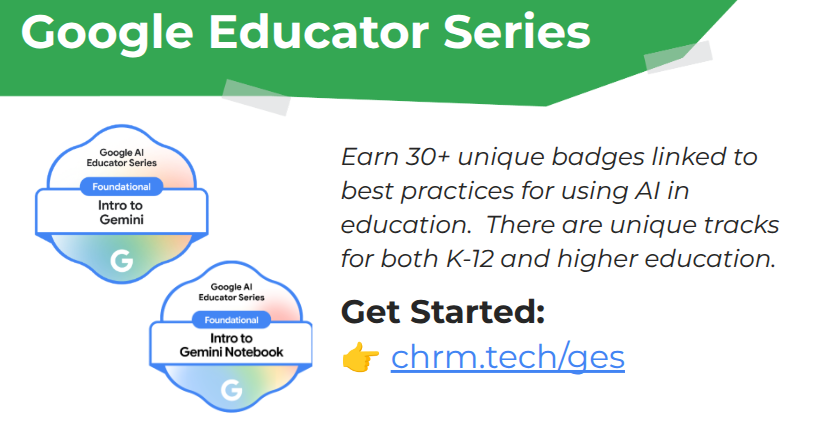
Earn a badge to document your skills!
We all know tech moves fast, and AI can feel overwhelming when you’re already managing a full classroom. Here is why the GES program is genuinely helpful:
- Bite-Sized & Free: You don’t need hours of free time. You can knock out a badge during your prep period or over a quick cup of coffee.
- Practical Classroom Use Cases: The training isn’t abstract theory—it focuses on immediate tasks like modifying a reading passage for different Lexile levels or writing a parent update email.
- Portfolio Ready: Each completed badge gives you a verifiable credential you can showcase on your resume, email signature, or district PD logs.
🌟 Tip: your badges are saved to a cool portfolio site called credential.net. Click here to see my badge portfolio!
How to earn your first badge
Getting started takes less than two minutes:
- Create Your Free Account: Head over to chrm.tech/ges to set up your profile.
- Browse the Badges: Select a topic that fits your current classroom needs (I recommend starting with Introduction to Gemini for Education or Intro to Gemini Notebook).
- Complete the Assessment: Answer the brief assessment questions at the end of the lesson.
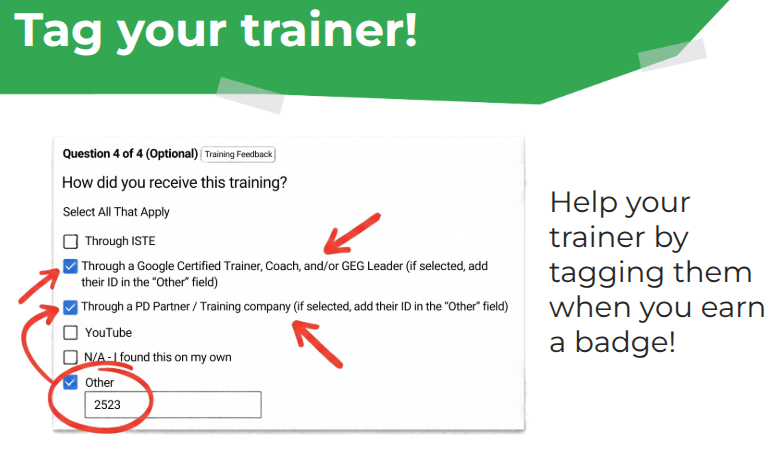
- Tag Your Trainer: When you complete the assessment on Question 4:
- Select “Through a Google Certified Trainer, Coach, and/or GEG Leader”.
- Choose “Other” and enter my partner tracking code
2523in the box.
Related Post: Google Gemini: your elementary teaching assistant!
Entering code 2523 tells Google that I (John) am helping educators build their AI skills which helps keep this blog and the resources I create free for teachers.
Badge up friends!
Which badge did you earn? Are you trying to collect ’em all? Look for new learning modules and badges each month!
Want more tips like this, delivered directly to your inbox? Sign up for the Google EDU Update, my monthly email newsletter for teachers!

Reader Interactions